
Installation
Install the Android app first, then connect with the browser extension or configure the proxy endpoint manually.
1. Android APK
Phone + SIM
Active cellular data plus Wi‑Fi or USB LAN for the local connection.
Start setup- Allow app installation from your selected source in Android Settings.
- Open the downloaded APK and confirm installation.
- Launch 8PROXY and allow notifications. The foreground notification keeps the service active.
2. First start
- Connect the phone and client to the same local network.
- Keep cellular data active on the phone.
- Use protocol
AUTOand port8888unless your client requires a specific mode. - Enable Basic Auth when the local network is shared.
- Tap Start and copy the endpoint shown in the app.
3. Enable IP rotation: set 8PROXY as the assistant
/newip API cannot toggle airplane mode to request a new mobile IP.- Open 8PROXY and tap Rotate IP Address.
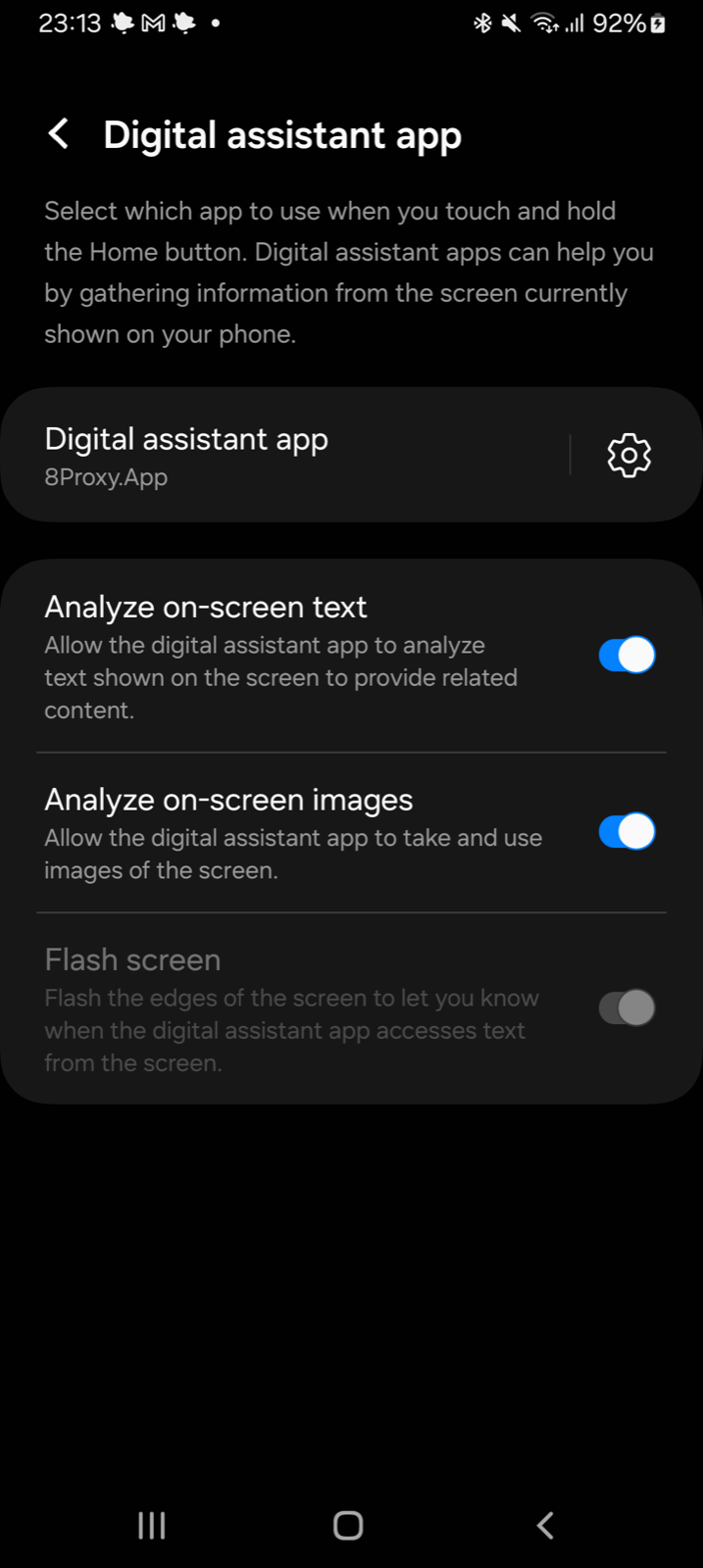
- Open Settings → Apps → Default apps → Digital assistant app. On Samsung, use Settings → Apps → Choose default apps → Digital assistant app.
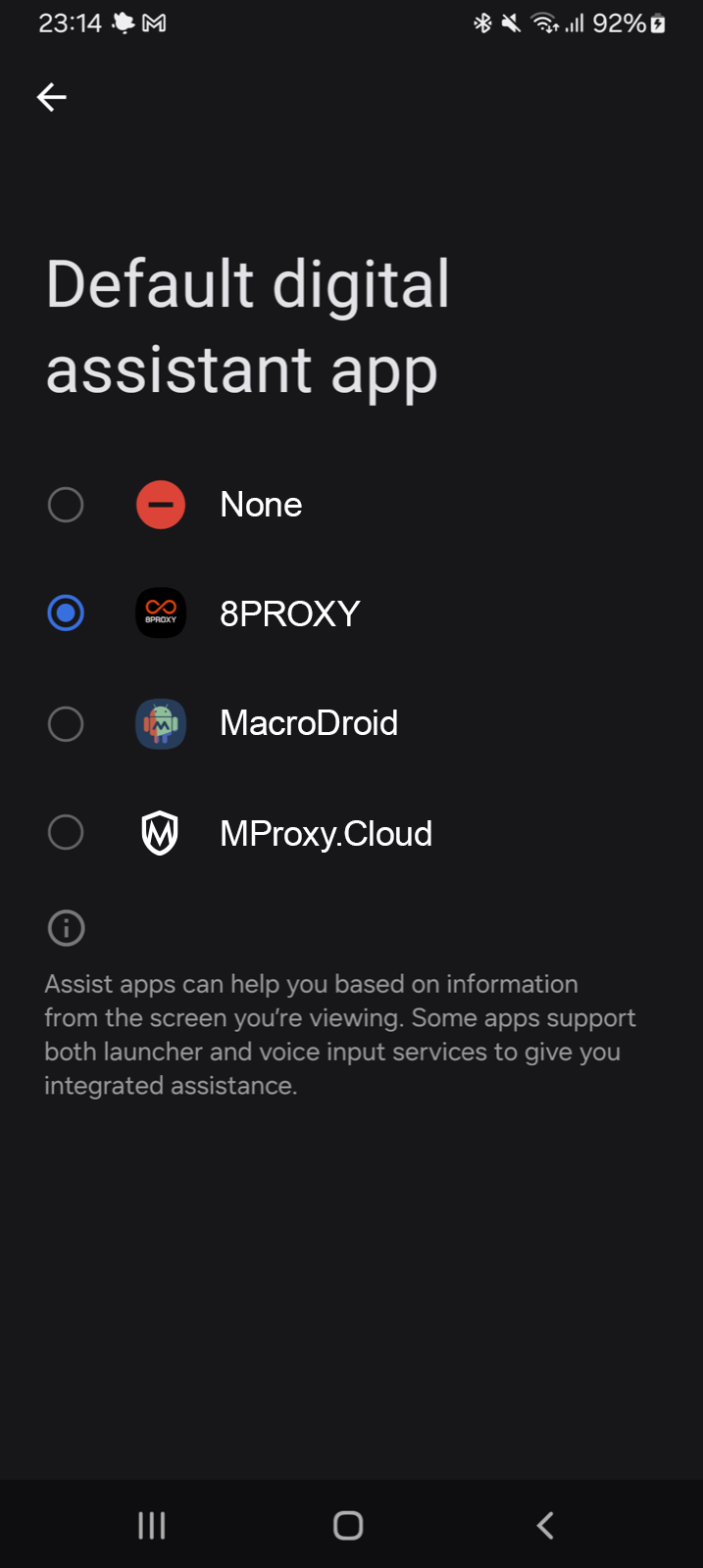
- Select 8PROXY and confirm.
- Return to 8PROXY and tap Rotate IP Address again.
Visual interface guide
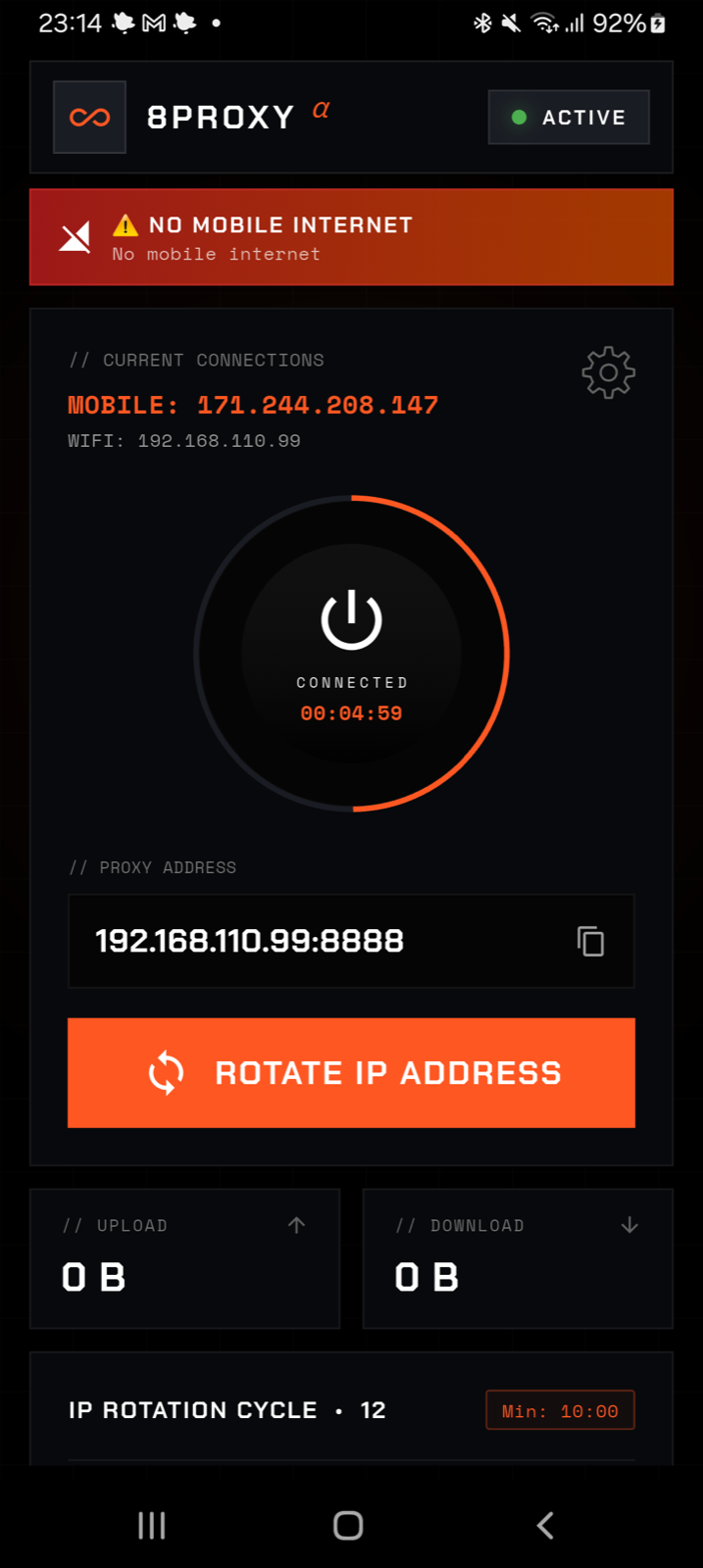
The numbered markers identify the controls and values shown by the current Android app.
Dashboard
 01
02
03
04
05
06
07
08
01
02
03
04
05
06
07
08
- 01Start / Stop
Starts or stops the proxy. The center shows the connection time.
- 02Proxy address + copy
Copy this address into the extension, browser, script, or proxy client.
- 03Rotate IP Address
Requests an immediate mobile IP change.
- 04Mobile public IP
The public address used by proxy traffic.
- 05Local Wi‑Fi / USB address
The phone address used by clients on the local network.
- 06Settings
Opens rotation, authentication, port, protocol, and interface settings.
- 07Proxy status
ACTIVEmeans the local proxy is running. - 08Cellular warning
Mobile internet is unavailable. Proxy traffic cannot exit through the SIM.
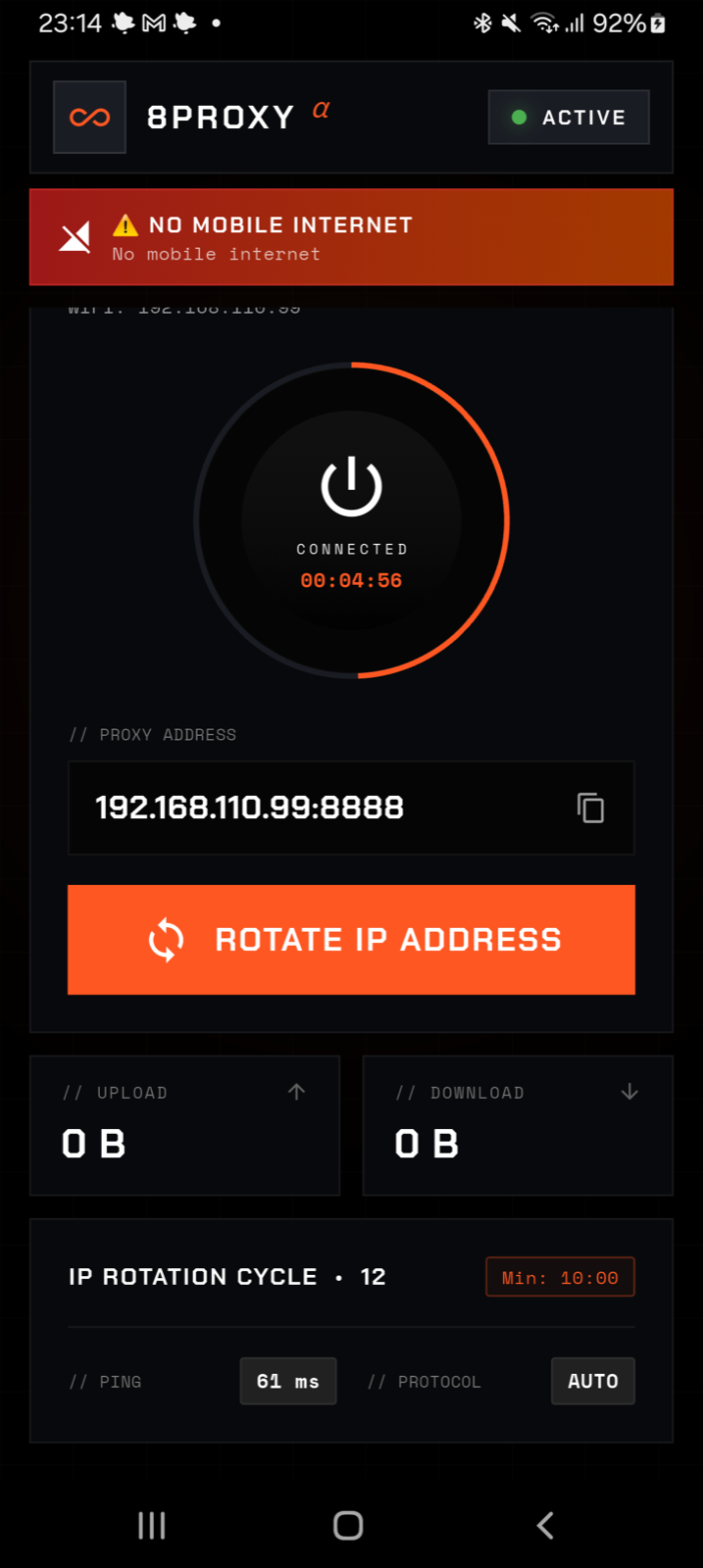
Traffic & status
 09
10
11
12
13
14
09
10
11
12
13
14
- 09Upload
Total data sent through the proxy during the current session.
- 10Download
Total data received through the proxy during the current session.
- 11Rotation count
Number of completed IP rotations in the current run.
- 12Rotation interval
Configured time between automatic IP rotations.
- 13Ping
Current mobile-network latency.
- 14Protocol
Active mode:
AUTO,HTTP/S, orSOCKS5.
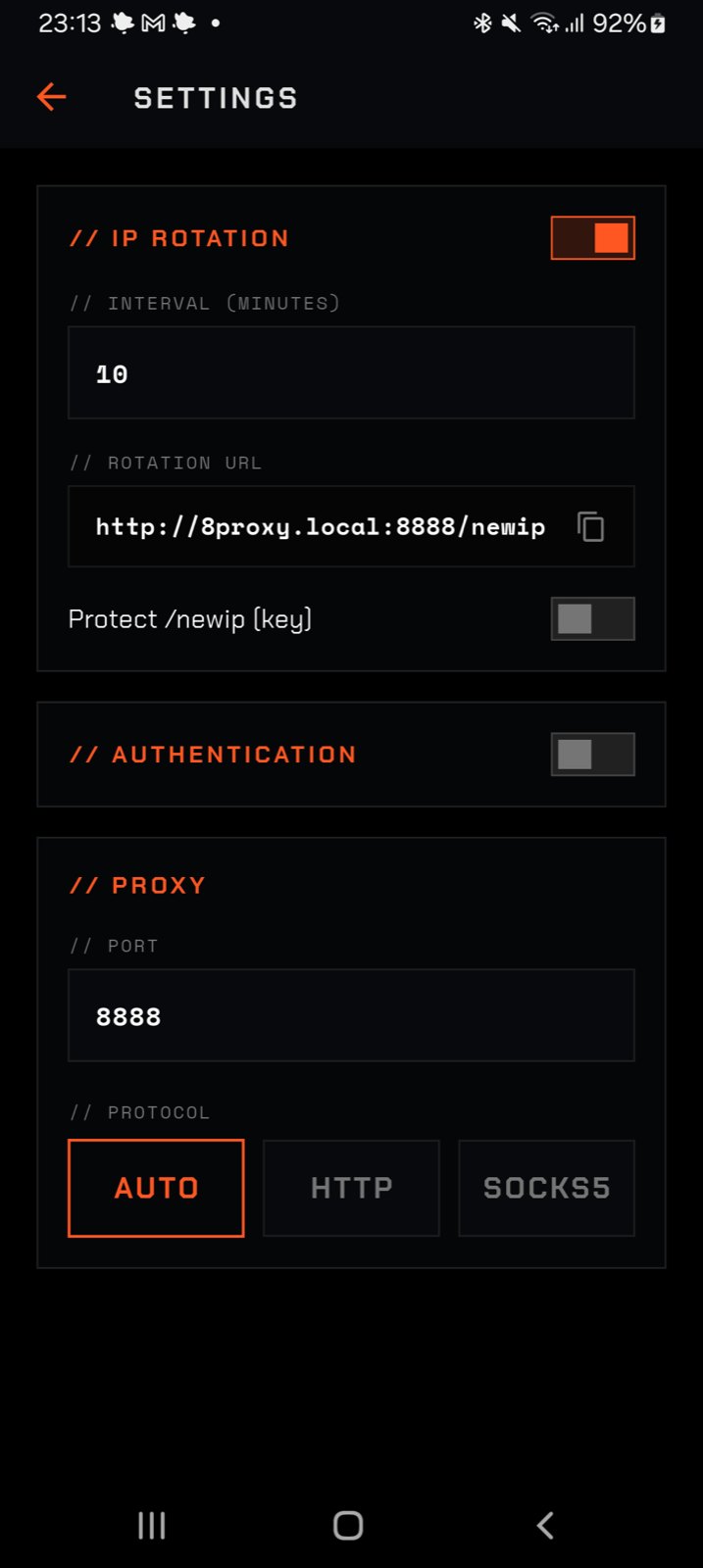
Settings
 01
02
03
04
05
06
07
01
02
03
04
05
06
07
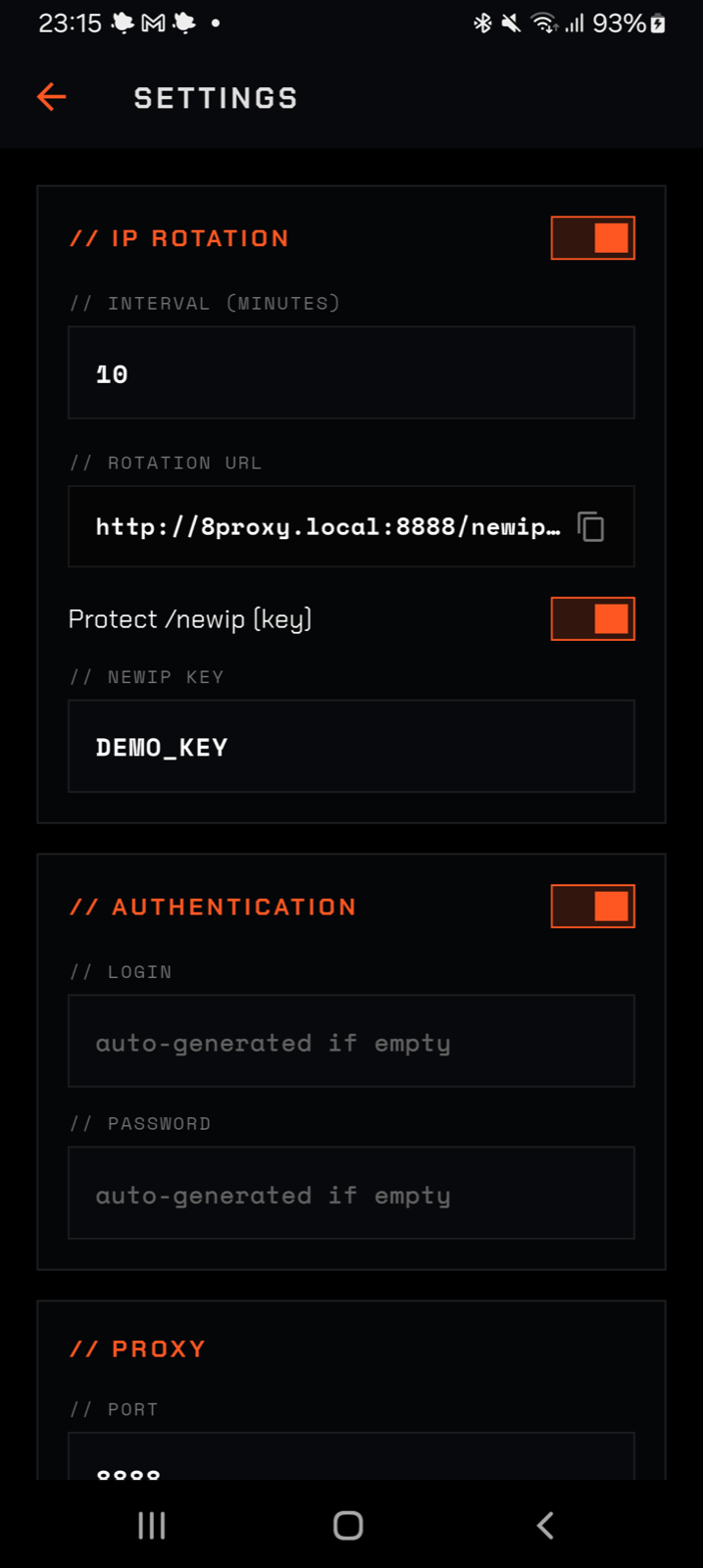
- 01IP Rotation
Enables the rotation subsystem. Turn it off when the proxy must keep the same carrier session.
- 02Interval (minutes)
0means link/button-only rotation. Values from 1 to 1440 schedule automatic rotation while the service is running. - 03Rotation URL
Copyable local endpoint for scripts and AI agents:
http://8proxy.local:PORT/newip. - 04Protect /newip
Requires a key on rotation requests. Enable this on shared Wi‑Fi so other devices cannot rotate the phone anonymously.
- 05Authentication
Requires a username and password for proxy traffic. This is separate from the
/newipkey. - 06Port
Local listening port. Default:
8888. Clients, the extension, and control URLs must all use the same port. - 07Protocol
AUTOdetects HTTP or SOCKS5 on the same port.HTTPsupports plain HTTP and HTTPS CONNECT.SOCKS5is for SOCKS-compatible clients and remote DNS. - 08Connection interface — conditional
The
WI‑FI / USBselector appears only when both interfaces are available. It chooses the local address advertised to clients; outgoing traffic still uses cellular data.
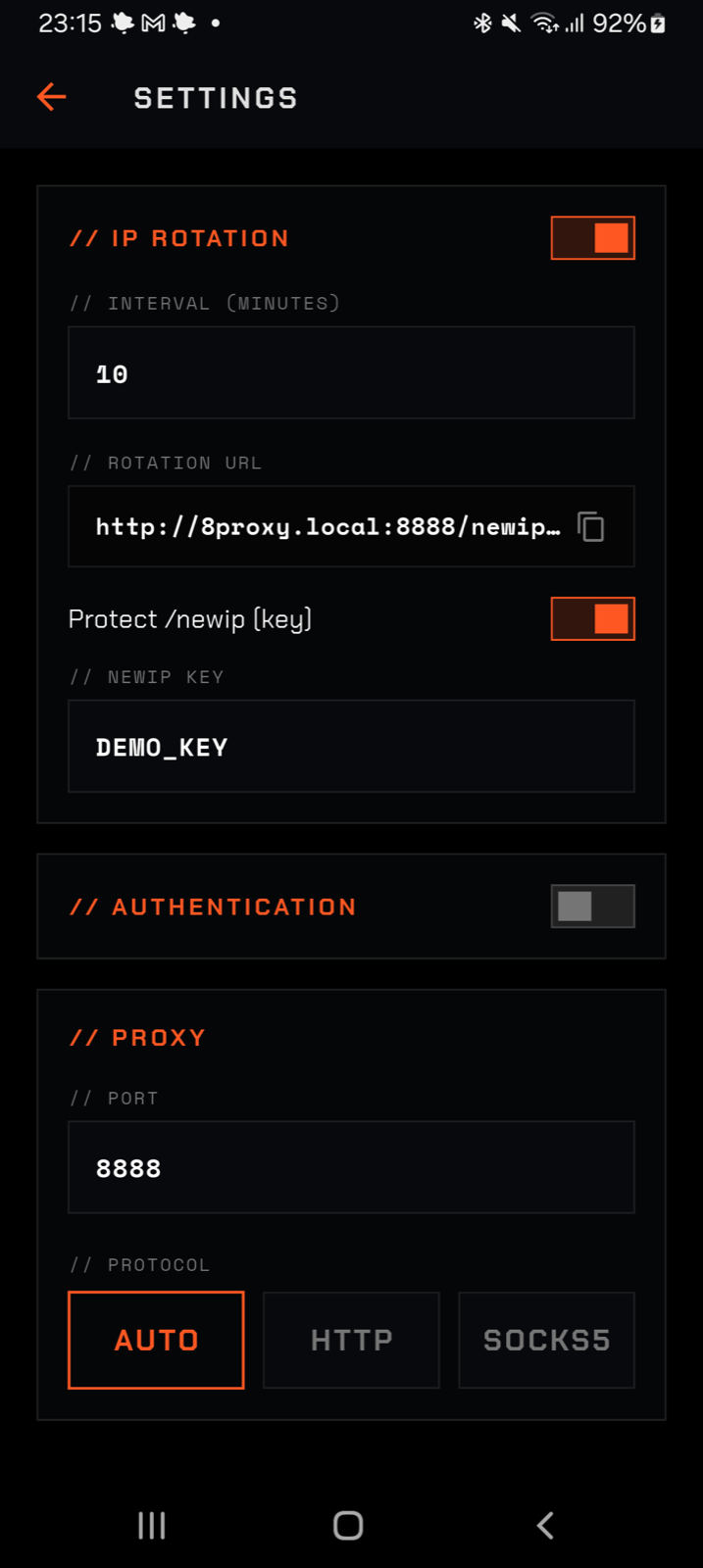
Protect the /newip URL
 01
02
03
01
02
03
- 01Enable the key gate
When enabled,
/newiprejects requests that do not contain the correct key. - 02Protected URL preview
The copyable URL automatically includes
?key=…. Treat it as a local control secret. - 03NEWIP KEY
An eight-character key is generated when the gate is enabled for the first time. Edit it if needed; the screenshot uses the non-secret example
DEMO_KEY.
Proxy authentication
 01
02
03
01
02
03
- 01Proxy Authentication
Protects HTTP and SOCKS5 proxy access with credentials. Recommended on any network you do not fully trust.
- 02Login
Proxy username. Leave it empty to let 8PROXY generate one when the proxy starts.
- 03Password
Proxy password. Leave it empty for automatic generation. Copy the complete authenticated endpoint from the Dashboard.
Android: Digital Assistant
Digital Assistant
 01
01
Choose 8PROXY
 02
02
- 01Check the assistant
The Digital assistant app row must show 8PROXY.
- 02Choose 8PROXY
Open the row and select 8PROXY.
- 03Test IP rotation
Return to 8PROXY and tap Rotate IP Address.
Chrome extension
8PROXY Proxy Manager connects Chrome to 8PROXY Mobile and keeps additional proxy profiles in one place.
Chrome Web Store
Install it from the Chrome Web Store in one click.
Install in Chrome
- 01Open the store page
- 02Add to Chrome
Click “Add to Chrome”, then confirm with “Add extension”.
- 03Pin it
Pin Proxy Manager from Chrome’s Extensions menu.
Main screen

- Current connectionPublic IP, country, session time, rotation count, ping, and protocol.
- Rotate IPThe circular arrows request a new mobile public IP.
- 8PROXY MobileYour phone’s local proxy endpoint. Use the power button to connect or disconnect it.
- Refresh / SettingsReload connection data or open proxy settings.
Proxy list

- 8PROXY MobileThe local address detected from your phone.
- Other ProxySaved HTTP and SOCKS5 profiles with location and ping.
- Power buttonConnect to the selected proxy or disconnect it.
- Refresh / SettingsRefresh the list or open proxy management.
Settings

- Add ProxyEnter the proxy IP and port. Name, username, password, and note are optional.
- Rotation URLAdd the provider’s URL when the proxy supports IP rotation.
- Import listAdd multiple proxy profiles from a prepared list.
Bypass

- Bypass listAdd one host rule per line. Matching addresses connect directly without the proxy.
- DefaultsRestore the default local-address rules.
- Save RulesApply the current bypass list.
Backup

- Export BackupDownload all proxy profiles and settings as a JSON file.
- Import BackupReplace the current profiles and settings with a backup.
- Keep it privateThe backup can contain proxy passwords in plain text.
Network path
Every client reaches the phone over the local network. 8PROXY then creates a separate upstream connection bound to the phone’s cellular network.
Local in. Cellular out.
flowchart LR
  CLIENTS["Browser · AI agent · curl · app"]
  LAN["Wi-Fi or USB LAN"]
  PROXY["8PROXY on Android
8proxy.local:8888"]
  CELL["SIM · Cellular network"]
  WEB["Internet destination"]
  CLIENTS --> LAN --> PROXY --> CELL --> WEB
  classDef core fill:#180b08,stroke:#ff5424,color:#ffffff,stroke-width:2px
  classDef edge fill:#0b0b0e,stroke:#34343b,color:#f4f4f1
  class PROXY core
  class CLIENTS,LAN,CELL,WEB edge
| Client type | Entry point | Use when |
|---|---|---|
| Browser extension | 8proxy.local:8888 | Chrome or Edge needs a fast on/off switch. |
| HTTP proxy | http://HOST:PORT | curl, scripts, browsers, and HTTP tooling. |
| HTTPS through proxy | HTTP CONNECT | The destination itself uses HTTPS. |
| SOCKS5 | socks5h://HOST:PORT | Apps or bots that support SOCKS5 and remote DNS. |
| Control API | http://HOST:PORT/status | Local automation and AI agents. |
| ADB | USB or configured wireless debugging | Start, stop, rotate, inspect, or reboot the phone. |
Address & protocols
The proxy listens on port 8888 by default. Use mDNS when supported or the phone’s LAN address shown in the app.
Mixed clients
Detects HTTP or SOCKS5 from the first byte on the same port.
HTTP + HTTPS
Forwards plain HTTP and creates CONNECT tunnels for HTTPS.
SOCKS clients
Supports RFC 1928 and username/password authentication.
8proxy.local does not resolve, use the numeric Wi‑Fi or USB IP from the dashboard. IP rotation changes the mobile public IP, not the phone’s local proxy address while LAN connectivity remains active.API for AI & automation
The control API is intentionally small and runs on the same host and port as the proxy. It is designed for local scripts, orchestration tools, and AI agents that can make HTTP requests or run shell commands.
Base URL
| Endpoint | Purpose | Authentication | Typical time |
|---|---|---|---|
GET /status | Proxy listener state and LAN address. | None | Immediate |
GET /newip | Request one mobile IP rotation and wait for its result. | Optional ?key= | Several seconds; hard timeout is 45 s |
GET /status
running=true confirms that the listener is active. It does not guarantee that the carrier currently has working internet, so critical automation should also perform a request through the proxy.
GET /newip
Response contract
| HTTP | Body | Agent action |
|---|---|---|
200 | {"success":true,"ip":"…"} | Accept the new IP and verify the next request. |
403 | {"success":false,"err":"invalid or missing key"} | Fix the key; do not retry anonymously. |
500 | {"success":false,"err":"rotation failed"} | Check SIM, mobile data, and rotation setup. |
504 | {"success":false,"err":"rotation timed out"} | Wait, check status, then retry once. |
Agent-ready shell runbook
/newip key on shared LANs.IP rotation
A rotation briefly resets the cellular radio, waits for mobile service to return, closes stale upstream sockets, and reports the newly observed public IP.
| Trigger | Best use | LAN impact |
|---|---|---|
| App button | Manual operation on the phone. | Depends on the available rotation method. |
GET /newip | Browser automation, scripts, and AI agents. | URL stays reachable when Wi‑Fi remains connected. |
| Native timer | Unattended rotation every configured interval. | Runs even when the Flutter UI is closed. |
| ADB broadcast | Development rigs and managed phone farms. | Control travels over the ADB connection. |
adb shell svc data | Direct shell rotation. | Wi‑Fi stays active. |
| Airplane mode | Fallback when mobile-data toggle is unavailable. | May disconnect Wi‑Fi temporarily. |
svc data disable/enable, which keeps Wi‑Fi connected.ADB control & phone reboot
The code contains several control paths that look similar from the outside but do different work. ADB is the system-control channel; the HTTP API and the app’s internal rotation pipeline are separate.
What “restart” means
| Operation | What changes | Implemented command |
|---|---|---|
| Rotate mobile IP | Resets cellular connectivity and keeps the proxy process alive. | GET /newip, app button/timer, ADB broadcast, or direct ADB shell. |
| Restart proxy listener | Rebinds the port/protocol, drops active connections, preserves the process and counters. | Internal HttpProxyServer.restart() when settings change; no public HTTP endpoint. |
| Restart app process | Stops and launches the Android application. | adb shell am force-stop plus launcher command. |
| Reboot phone | Restarts Android and temporarily removes every proxy/control connection. | adb reboot; no in-app or HTTP reboot command exists. |
Internal commands vs external ADB
AirplaneModeService contains internal Runtime.exec attempts for cmd connectivity and svc data. They run as the normal app UID and usually fail on a non-rooted consumer phone because those commands require shell privileges. The app then falls back to the configured Digital Assistant path. This is not an embedded ADB client.
The ADB broadcast path is different: an external adb shell process sends an intent to the exported ProxyCommandReceiver, which then calls the same process-level ProxyCore rotation queue used by the UI and /newip.
Start, stop, rotate, and inspect
START_PROXY starts the listener, mDNS, and cellular binding without opening Flutter. It does not load saved Basic Auth credentials, and its code-level defaults are 8080 / http, so automation should always pass --ei port 8888 --es protocol auto. It also bypasses the UI start sequence that enables the Foreground Service and WakeLock; use the normal app start path when long background survival is required.Direct external ADB rotation
These commands bypass ProxyCommandReceiver and change Android connectivity directly. The running proxy observes the network loss and rebinds when cellular service returns.
Restart only the 8PROXY app
Reboot the entire phone
adb reboot, never reboot in a retry loop, and expect the proxy to be unavailable until Android and cellular service finish starting.Limits & operational notes
- An active SIM and working cellular data are required.
- The client and phone must be reachable on the same local network unless you provide your own secure private tunnel.
- mDNS
8proxy.localis convenient but not universal; use the numeric LAN IP as the fallback. - Your carrier assigns the next public IP. A different address is not guaranteed after every radio reset.
- Active upstream connections may drop during rotation or when changing the proxy port or protocol.
- Basic Auth protects proxy use. The separate
/newipkey protects rotation./statusremains available on the local listener. - The HTTP API cannot reboot Android, restart the app, or change system settings. Use ADB for those operations.
- Speed and latency depend on the phone, signal, plan, and carrier.